Came across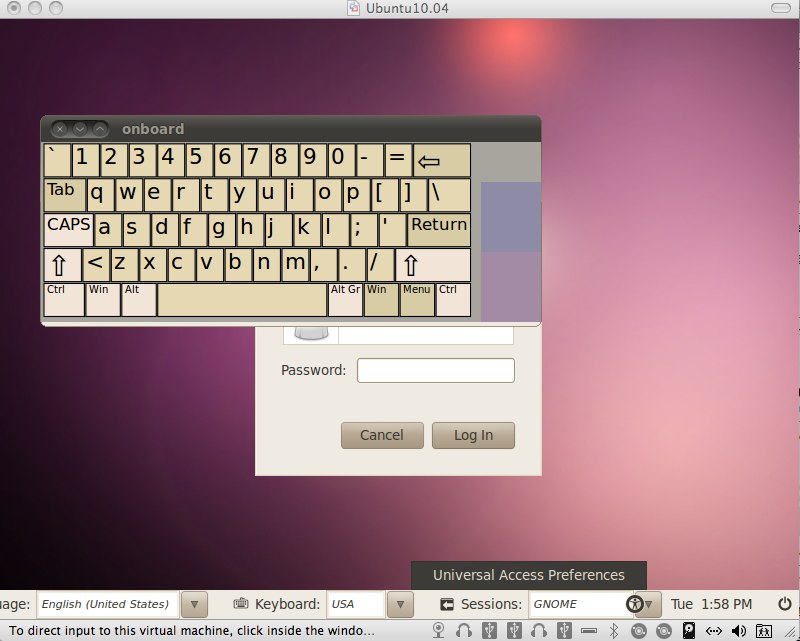 a nasty little bug when I installed the latest Ubuntu 10.04 (LTS) into a virtual machine using VMWare Fusion 3.02 on my OSX box. This was a fresh install and the install itself went smooth, the problem occured when the initial login screen appeared. Although my mouse worked just fine and I was able to click on the user to log in, I wasn't able to type anything. My keyboard was completely unusable within the virtual machine. I was not able to type any input via the keyboard.
After doing some Googling I discovered that once you got past the login screen the keyboard would work fine. The only way to login was to initiate the on-screen keyboard and type in your password. You can bring up the on-screen keyboard by clicking on the Universal Access icon on the lower right hand side of the screen and choosing "Use on-screen keyboard". One side note here, when I first checked the box to use the on-screen keyboard, the keyboard would flash and disappear. What I needed to do was keep the box check and reboot the machine, when the login screen returned, the keyboard was there.
Once I logged in the physical keyboard worked fine. I was able to use it in all the applications and didn't notice any problems, but once I logged out and returned to the login screen, again no input from the physical keyboard. Now I needed to fix this.
What didn't work 🙁
At this point I go into basic trouble resolution mode and decided to start by reinstalling and upgrading the VMWare tools. Not going to get into a step by step here how to do that but the short of it is after reinstalling the VMWare tools and rebooting I was stuck in the same situation and needed to use the on-screen keyboard to log in. Next obvious step, apply all patches to the Ubuntu desktop, did this, rebooted, still no go.
What did work 🙂
Clearly, you are not reading this article to learn how not to fix it. Trust me after doing enough searches there are plenty discussion threads out there with "This doesn't work for me either, anyone fix this yet?" to keep you reading for hours. I found a couple good links that I will post at the end of this article that got things resolved. The short answer is I logged into the machine, fired up and console window, type in the command
[bash]
sudo dpkg-reconfigure console-setup
[/bash]
For keyboard I selected "Apple" and then just selected the defaults for everything else. Once I exited the configuration wizard, I restarted the machine and all was right with the Ubuntu world again. Did a couple reboots to make sure and everything seems to be working fine now.
One more side note
This issue occurred on a clean install of the current Ubuntu 10.04 LTS release. I had been previously running the beta version of the 10.04 release which worked fine and never had a problem with the keyboard input. However, after patching that box today, same issue occurred.
The Links
Two links basically lead me to my resolution
- http://ubuntuforums.org/showthread.php?t=1466482 - A great thread discussion on the issue in general. There were a couple of "fixes" in there including the one I implemented. A couple of post go off track but for the most paart a good thread.
- https://bugs.launchpad.net/ubuntu/+source/xorg-server/+bug/548891 - The bug report on the issue which also includes the work around.