Category Archives: Geek Stuff

Killing IM with killall and taskkill

I’ve stated before how I am fortunate to be in a position where I typically work on a Linux, OSX, and Windows desktops on regular basis. Depending on what I am doing and my location I might spend a good amount of time on any of these systems. For the most part, my life style makes this pretty easy. I live in “the cloud” a lot for things like email and even documents. I keep things standard complaint and use tools that are typically cross-platformed or have counterparts on other platforms. This has afforded me some great freedoms and have allowed me to unchain myself and not be too dependent on any one solution. Instead my life has become one of preference and knowledge.

However, with everything there has always been pain points, one for me has been IM. While yes, it no longer matters which platform I am on at any given time I am still able to access my Yahoo, AIM, MSN, Gtalk accounts, the issue comes into play when I move from one machine to another and forget to sign out of IM on the previous machine. Some of the IM services alert you when you are logged onto one accounts from multiple systems and allows you to decide what to do, like AIM which gives you an option to send it a command to log you out of your previous session. Some just don’t care, like Gtalk which doesn’t seem to be concerned with how many times and from how many locations you are logged in, I don’t particularly like this approach. Then there are services like Yahoo that just get upset and decides to log you out from one of your accounts, couple that with IM clients that battle to keep their connection like Trillian and you can end up in a situation where you can’t log into your account because another is already logged in and wont let go.

I’ve come up with a few approaches that have made this situation somewhat manageable. On my Linux and OSX box this is pretty simple, there is a command line command called ‘killall‘ that comes to the rescue. With the line ‘killall pidgin’ or ‘killall Adium’ my IM clients on Linux and OSX respectively, end. Add the ability to ssh into these systems and if I forget to log out I simple do a quick ssh connection to these boxes, run my command and I am done. Furthermore, I typically have a good idea when I wont be at those computers, so with that information and the killall command, I am able to add crontab entries to automatically run my command. So for example, I know at 3AM I don’t want to be up IM’ing with anyone so I run that command at that time in case I left my IM client running before going to bed. I also know Monday through Friday I am typically at work and in my office around 8AM so I run that command on my home systems at that time too in case I left the house without logging out. The command ends up looking like this in crontab, 00 03,08 * * * /usr/bin/killall Adium > /dev/null 2>&1 Worse case scenario, I ssh back to the system and manually run the command. Its a great system and works like a charm.

At work the story is a little different. First off, the system I run IM on is a Windows machine which doesn’t have the cool ability to just SSH to and even if I did install an SSH server on the machine it is located behind a corporate firewall so I wouldn’t be able to get it anyways from the outside. I do have the ability to log in via VPN but that is a lot of work to log into the corporate VPN and RDP to my desktop just to turn off an IM client. Windows also doesn’t really have crontab, it does have a “scheduler” which acts kind of acts like crontab but that coupled with the fact that Windows doesn’t really have the same powerful command line tools that Linux and OSX have makes this simple task a little tougher to accomplish.
Get the whole story »

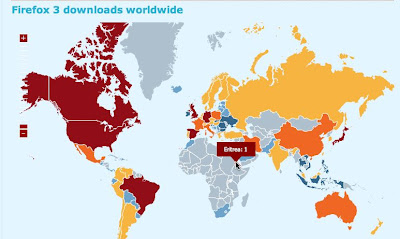
Firefox Downloads +1

Firefox 3 browser, 3 millions plus downloads worldwide and growing. Wonder what its like being the only dude in Eritrea to have downloaded it. That guy (or gal lets be fair) deserves a some Firefox swag.

http://www.spreadfirefox.com/en-US/worldrecord/

'Warcraft' Sequel Lets Gamers Play A Character Playing 'Warcraft'

This is taking Online Roll Playing to the next level allowing you to play a character playing a character in a game. I think it might be time to start playing games online.


‘Warcraft’ Sequel Lets Gamers Play A Character Playing ‘Warcraft’

Is the Terminator, a Sony Playstation at heart?

Will we have Sony to blame when computers become self-aware and start taking over the earth? I came across a news story today that leads me to think, “Yeah, maybe.”

Military Supercomputer Sets Record

Here is the piece that caught my attention.

“The Roadrunner is based on a radical design that includes 12,960 chips that are an improved version of an I.B.M. Cell microprocessor, a parallel processing chip originally created for Sony’s PlayStation 3 video-game machine. The Sony chips are used as accelerators, or turbochargers, for portions of calculations.”

Check out the full story on The New York Times Website

Geek Gang Signs

For you hard core, Assembly Language Programming hommies.

Article from http://www.joeydevilla.com/2008/05/29/geek-gang-signs/

The Website is Down, Check The X-Box

Gaming consoles these days are down right powerful machines. I’ve read stories about people running Playstation3 Cluster Farms and other fun projects. This is a funny story I came across about a University using an X-Box for a web server.

The website is down because someone removed the X-Box

Great Mac tar archive tip

Every now and then I just post things I don’t want to forget or worried that the original website might disappear. This is one of the cases. This is a blog posting I came across on a little problem that plaques those of us that enjoy using OS X but have a need to move files to other systems like Linux and Windows.

There is a dirty little secret the Mac hides from you when you are using it but becomes a glaring eyesore when you move to another OS. Some file clean up needs to happen because OSX creates these hidden files that start with a ._ which contains some extended information about the file that no other system reads so they aren’t terrible useful when moving files to these systems. This post from a person working for Splunk, outlines how to tar up files on a OSX machine that is targeted for other systems and exclude the ._ files from the tarring process. Original article can be found here

————— POST ———————-

When building Splunk applications, I’m often working on a Mac. There
are files that begin with ._ that are resource files, which contain
extended attribute information about the files for the OS. This is
great and all but I don’t want to include these files when I package up
an application and upload it to SplunkBase.

If you don’t have deep OSX knowledge, then keeping these files out
of your tarball is harder than it looks. One of our OSX gurus pointed
me toward the answer, and I was so excited (yes, I am a geek) that I
just had to share.

To build a tarball in Leopard that doesn’t contain the ._ files, use:

COPYFILE_DISABLE=true tar cvzf filename.tar.gz dirtotar

In Tiger, use:

COPY_EXTENDED_ATTRIBUTES_DISABLE=true tar czvf filename.tar.gz dirtotar

This is definitely going in my .bashrc so I don’t have to fuss with it again:

export COPYFILE_DISABLE=true

————— PEND OF POST ———————-

Adding a Little Color to Your Inbox

Gmail has gotten colorful
Looks like Google decided to add a little color to their GMail product.

Color shot 1

Color Shot 2

Very nice addition, I do something similar using Mail Act-On and MailTags on my Mac.

Leopard Features

OK, I am by no means an expert with OSX, especially the new Leopard. I also know there have been a lot of new features added with this latest release of OSX so I could have very easily missed this one but when I stumbled onto it I thought it was really pretty cool.

If you select a file and hit the space bar you get a nice preview of the file.

Picture 1

If you do this while you have a folder selected you get some good information on the folder such has folder size.

Picture 2

And just as an FYI, you don’t even need to be in Finder to do this trick. You can do it directly on the Desktop. Just select something and hit the space bar.

Picture 3

Just one of many cool features I didn’t realize lived within Leopard.

Update: Finally found the name to this feature, Quick Look

Yahoo Mail now has integrated Chat

This is what Google does with their Gmail (email) and Google Talk (chat) products. When you log into Gmail, you have access to your Google Talk buddy list and can start chatting with them right there in the web browser. It’s been known to be convenient at times. Well it looks like you can now do the same thing with Yahoo which seems like a great idea to me.

Secured for spam by MLW and Associates, LLP's Super CAPTCHASecured by Super-CAPTCHA © 2009-2010 MLW & Associates, LLP. All rights reserved.